Custom branding
Your app name, your logo on the splash and login screens, and your colour scheme applied through the interface.
Included in the $250 package
The Android app is where most of your customers will actually experience your VPN. It carries your name, your logo and your colours, it lists the servers you added in your panel, and it logs in with the accounts you created there. It comes with the $250 VPN admin panel package — it is not an add-on.
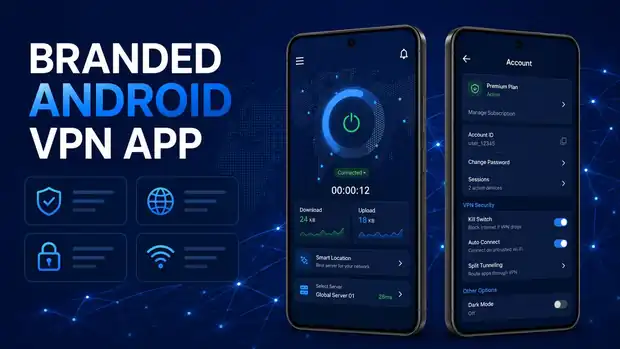
They open the app, type the username and password you gave them, and tap the power button. The app connects, the timer starts, and the download and upload figures move. If they want a different country, they open the server list and pick one.
That is deliberately the whole experience. A VPN app that needs explaining loses customers, so everything else — plan status, session count, password change, support ticket — sits behind the menu where it does not get in the way.
Because the app checks in with your panel, you stay in control from the other side. Suspend an account and the app stops connecting. Extend an expiry date and it keeps working. You never need to touch the customer's phone.
Your app name, your logo on the splash and login screens, and your colour scheme applied through the interface.
Users sign in with the credentials you issue in the panel. Expired or suspended accounts cannot connect.
The locations you add in the panel appear in the app with country labels, so customers pick a place rather than an IP address.
A single control to connect, a clear connected state, a session timer and live download and upload figures.
Plan status, account ID, active sessions and the option to change password, all inside the app.
Customers can raise a support ticket from the app, which lands in the ticket area of your panel.
App name, logo file and preferred colours.
The app is compiled with your branding and pointed at your admin panel.
Create an account in your panel, install the APK, log in and connect.
Host the APK for direct download from your own website, or publish it yourself under your developer account. We explain both routes.
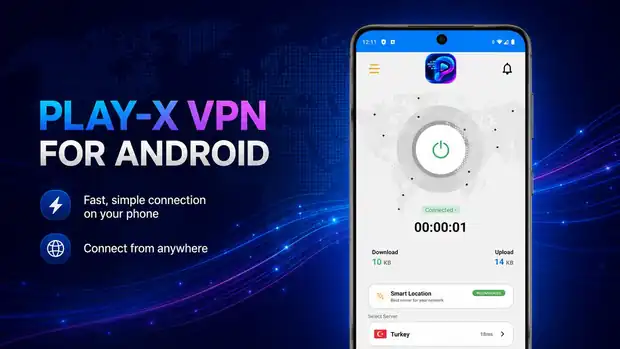
Before buying, you can test our VPN admin panel and Android app to understand how the complete system works. This is a real deployment, branded as Play-X VPN — the same platform you would receive under your own name.
Log in and browse the dashboard, user list, server list and reseller screens.
Download the demo Android app, sign in with a demo account and see the connect flow, server list and account screen.
Download Android Demo AppSee what a finished VPN business website looks like once the panel, apps and plans are all in place.
Visit Demo WebsiteThe demo panel is shared and reset periodically, so please do not store anything you need there. Everything you see is standard in the platform — your own deployment would carry your brand, your servers and your customers.
Questions
If the answer you need is not here, ask us on live chat or send it through the contact form.
Yes. The Android app and the Firestick app both come with the $250 VPN admin panel package.
Yes. The app name, logo and colour scheme are yours. There is nothing in the app that points back to PanelVPN.
The app is delivered as an installable APK you can host on your own website for direct download. If you want it on Google Play instead, you publish it under your own developer account — we explain what that involves.
Yes. There is a demo Android app you can download and use with the demo panel from the demo page.
Have a question about any product? Send us a message on live chat and we will walk you through it.
Start with the VPN admin panel and branded Android and Firestick apps at $250 one-time, then add the website, billing automation and desktop apps as your business grows. Test the live demo first — we would rather you saw it working.