
Custom branding
Your app name, your logo and your colours applied throughout the desktop interface.
Desktop app — $499 one-time
Phones are where VPN customers start; desktops are where they stay. Anyone using a VPN for work, for a home office or on a laptop expects a proper Windows application rather than a set of configuration files. This is that app, branded as yours and connected to the same panel and the same accounts as your mobile apps.
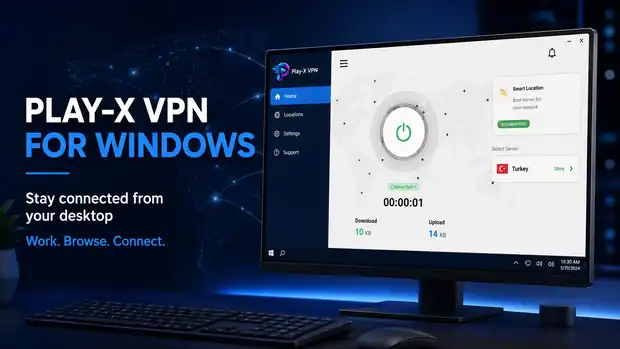
A mobile-only VPN quietly excludes a whole class of customer: the remote worker on a company laptop, the small office that wants every machine covered, the household that uses a desktop for everything that matters. Those customers usually pay for longer plans and cancel less often than casual mobile users.
They also compare you against the big-name VPN brands, all of which have a Windows client. Not having one is often the reason a business enquiry stops, even when your service is better.
The Windows app closes that gap. It is the same login, the same servers and the same expiry rules — your customer just gets a window on their desktop instead of a screen on their phone.
Your app name, your logo and your colours applied throughout the desktop interface.
A native desktop window with sidebar navigation for home, locations, settings and support.
The servers you add in your panel appear in the desktop location list, exactly as they do on mobile.
Customers sign in with the account you created in the panel — no separate desktop credentials.
Suspend, extend or expire an account in the panel and the desktop app follows the same rules.
You receive the build ready to distribute from your own website, plus guidance on how to publish it to your customers.
Windows, macOS and iOS are $499 each and all connect to the same panel. If you are planning to cover more than one, tell us what you need on the contact form and we will put the whole thing together as one project.
Questions
If the answer you need is not here, ask us on live chat or send it through the contact form.
A branded Windows VPN app is $499 as a one-time payment. It is separate from the $250 panel package, which covers Android and Firestick.
Yes. All apps connect to the same VPN admin panel, so one account works across the platforms you offer.
Yes — your app name, logo and colour scheme are applied throughout.
Have a question about any product? Send us a message on live chat and we will walk you through it.
Start with the VPN admin panel and branded Android and Firestick apps at $250 one-time, then add the website, billing automation and desktop apps as your business grows. Test the live demo first — we would rather you saw it working.