
Test before you buy
Live VPN Panel & App Demo
Nobody should spend money on a system they have not seen working. The demo below is a real, running deployment — the same admin panel and the same app architecture you would receive, branded as Play-X VPN. Log in, click around, install the app, and judge it yourself.
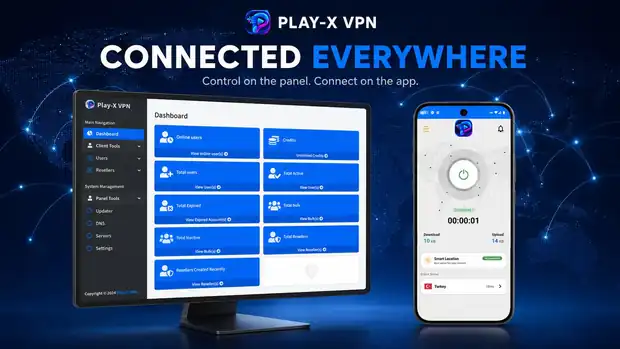
Test the system before you buy
Live demoBefore buying, you can test our VPN admin panel and Android app to understand how the complete system works. This is a real deployment, branded as Play-X VPN — the same platform you would receive under your own name.
Admin panel demo
Log in and browse the dashboard, user list, server list and reseller screens.
Android app demo
Download the demo Android app, sign in with a demo account and see the connect flow, server list and account screen.
Download Android Demo AppDemo website
See what a finished VPN business website looks like once the panel, apps and plans are all in place.
Visit Demo WebsiteThe demo panel is shared and reset periodically, so please do not store anything you need there. Everything you see is standard in the platform — your own deployment would carry your brand, your servers and your customers.
What to look at
A five-minute tour of the demo
If you only have a few minutes, these are the screens that tell you whether the platform fits your business.
-
Open the dashboard
Online users, total users, active and expired accounts, and reseller counts. This is the first screen you would see every morning.
-
Create a user
Client Tools → Create User. Type a username, a password and a duration. That is the entire process of selling an account manually.
-
Look at the user list
Status, online state, expiry date, device and per-account actions. This is where you extend, suspend or remove an account.
-
Open the server list
Panel Tools → Servers → View Server. Locations, categories and status — the same list your customers see inside the app.
-
Check the reseller screens
Create Reseller, View Resellers and Add Credit. This is how you let other people sell for you without giving up control.
-
Install the demo app
Download the Android demo, sign in and connect. Seeing an account you created in the panel work in the app is the moment the whole thing makes sense.
Questions while you are inside the demo? Send us a message on live chat and we will answer as you click.
What your own deployment would change
The demo runs under the Play-X VPN brand. Yours would not.
| In the demo | In your deployment |
|---|---|
| Play-X VPN branding | Your app name, logo and colours |
| Demo servers | Your own VPN servers and locations |
| Shared admin login | Your private admin account |
| Sample users and resellers | Your real customers and reseller network |
| Periodically reset | Persistent, and yours to run |
Demo questions
Can I test the VPN panel before buying?
Yes. The demo page gives you a live admin panel login, a downloadable demo Android app and a demo website, so you can see the full system before you decide.
Is the demo the same as what I would get?
It is the same platform, branded for the demo deployment. Yours would carry your name, your logo, your colours and your servers.
Will my questions be answered while I am testing?
Yes — start a live chat on any page or message us on Telegram while you are in the panel and we will answer as you go.
Where to go next
Seen enough? Let us build yours.
Send us your app name, logo and the platforms you want to cover, and we will tell you exactly what it costs and how long it takes.